Using your own ground truth
Open in Colab Download notebook
If you already have a 3D array that describes your sample (a segmentation, a mesh you voxelized, or shapes you generated), you can simulate it directly.
Make an array
The array holds the number of fluorophores in each voxel. Here: a dozen hollow spherical shells with random centers and radii, ten fluorophores per voxel of shell.
import numpy as np

shape = (64, 256, 256)  # Z, Y, X
z, y, x = np.ogrid[: shape[0], : shape[1], : shape[2]]
rng = np.random.default_rng(0)

truth = np.zeros(shape, dtype=np.float32)
for _ in range(12):
    cz, cy, cx = rng.integers(16, 48), rng.integers(30, 226), rng.integers(30, 226)
    r = rng.integers(8, 28)
    # distance from the center; Z voxels are twice as large as Y and X
    d = np.sqrt(((z - cz) * 2) ** 2 + (y - cy) ** 2 + (x - cx) ** 2)
    truth += (np.abs(d - r) < 1.5) * 10
Simulate it
Simulation.from_ground_truth takes
the array and its voxel size in µm, plus any other simulation parameters:
from microsim import schema as ms
from microsim.schema.optical_config import lib

common = dict(
    scale=(0.04, 0.02, 0.02),  # voxel size of the array, in µm
    output_space={"downscale": 4},  # 160 x 80 x 80 nm pixels
    detector=ms.CameraCMOS(qe=0.8, read_noise=1.5),
    settings=ms.Settings(random_seed=0),
)

widefield = ms.Simulation.from_ground_truth(truth, **common).run()

confocal = ms.Simulation.from_ground_truth(
    truth,
    modality=ms.Confocal(),
    channels=[lib.LASER_488.model_copy(update={"power": 5000})],  # W/cm² at focus
    exposure_ms=0.01,  # 10 µs dwell
    **common,
).run()
Plot one plane of each. The digital images have dimensions (c, z, y, x), and
their 16 Z planes cover the 64 planes of the array:
import matplotlib.pyplot as plt

panels = {
    "your array (z = 32)": truth[32],
    "widefield": widefield[0, 8],
    "confocal": confocal[0, 8],
}
fig, axes = plt.subplots(1, 3, figsize=(11, 4))
for ax, (title, image) in zip(axes, panels.items()):
    ax.imshow(image, cmap="gray")
    ax.set_title(title)
    ax.axis("off")
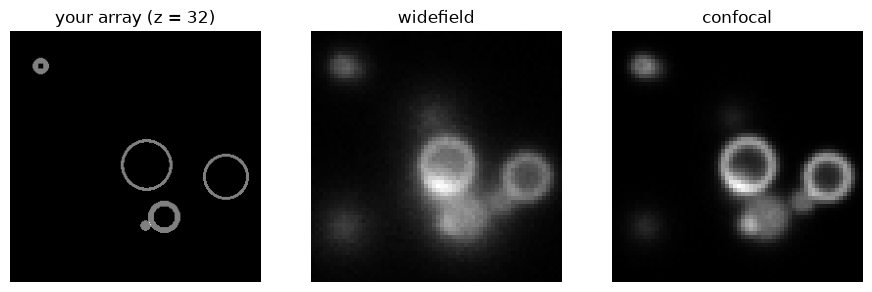
The widefield image shows rings from shells centered above and below this plane as blurred discs. The confocal image rejects most of that light.
Choosing a fluorophore
from_ground_truth uses the placeholder fluorophore. To use a real one, or to
combine several arrays as separate labels, use a "fixed-array"
distribution:
sim = ms.Simulation(
    truth_space={"shape": truth.shape, "scale": (0.04, 0.02, 0.02)},
    sample=[
        {
            "distribution": {"type": "fixed-array", "array": truth},
            "fluorophore": "mScarlet",
        }
    ],
    channels=[lib.TRITC],
)
Every array must have the shape of the truth space.
Things to keep in mind
- Values are fluorophore counts. A binary mask gives one fluorophore per voxel, which is usually very dim. Scale the array to a realistic labeling density (see Concentration).
- Voxel size. The array should be sampled finely enough for the optics: 50 nm or less laterally for a high-NA objective. If your data are coarser, upsample them first.
- Anisotropy.
scalecan differ between axes, as here, where Z voxels are twice as large. - Identity modality. If your array is already a microscope image and you
only want the spectral and detector parts of the simulation, use
modality=ms.Identity(), which skips the PSF.