Spaces
A simulation uses two grids:
- The truth space is where the sample is drawn and the optical image is computed. It should be fine enough to represent the structures in your sample and to sample the PSF well, typically 10–50 nm per voxel.
- The output space is the pixel grid of the final image, as recorded by the detector. A typical camera pixel, projected onto the sample, is 60–160 nm.
Both have the same physical extent. The optical image is computed in the truth space and then binned down to the output space just before the detector model.
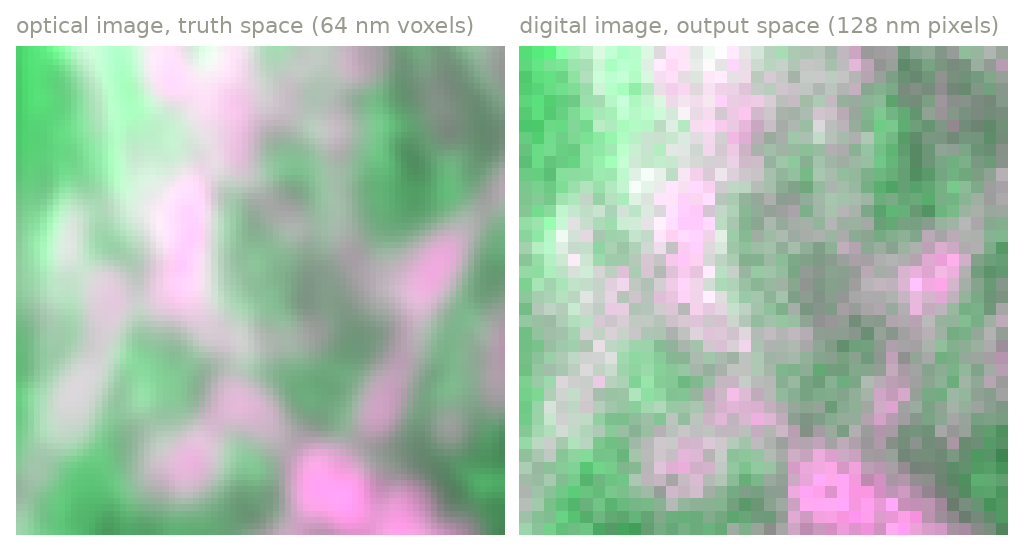
A detail of the overview figure: the optical image on the 64 nm truth grid (left), and the digital image after binning 2 × 2 × 2 to the 128 nm output grid (right).
Defining a space
A space has a shape (number of voxels along Z, Y, X), a scale (voxel size
in µm), and an extent (shape × scale). Give any two and the third is
computed:
A single number for scale applies to all axes: scale=0.02 is the same as
scale=(0.02, 0.02, 0.02). A space can also be 2D, with a shape of length 2.
Relative spaces
Usually one space is given explicitly and the other is defined relative to it:
# the output pixels are 8x larger than the truth voxels, along every axis
ms.Simulation(
    truth_space={"shape": (128, 512, 512), "scale": (0.02, 0.01, 0.01)},
    output_space={"downscale": 8},  # -> shape (16, 64, 64), scale (0.16, 0.08, 0.08)
    ...
)

# or: start from the image you want, and compute the truth space from it
ms.Simulation(
    truth_space={"upscale": 4},  # -> shape (64, 256, 256), scale (0.04, 0.02, 0.02)
    output_space={"shape": (16, 64, 64), "scale": (0.16, 0.08, 0.08)},
    ...
)
downscale and upscale take one integer for all axes, or one per axis
(e.g. {"downscale": (4, 8, 8)}). At most one of the two spaces may be
relative.
output_space may be omitted, in which case the digital image has the shape
and scale of the truth space.
How the downsampling works
When the optical image is binned into the output space, Y and X are handled differently for cameras and point scanners:
- A camera pixel collects all the light that falls on its area, so the truth voxels in each output pixel are summed in Y and X.
- A point scanner records the signal at each scan position, so the truth voxels are averaged. The dwell time, not the pixel area, sets the signal.
In Z, voxels are always averaged: each output plane is a separate exposure at one focal position, and does not collect light from neighboring planes.
As a consequence, changing output_space changes the camera's signal per pixel
(larger pixels collect more light) but not the point scanner's.
Choosing the sizes
Guidelines
- Truth voxel size. The truth grid must resolve the PSF: at 1.4 NA and 500 nm emission the lateral resolution is about 200 nm, so 20–50 nm voxels are adequate for the optics. Finer voxels are needed only to represent fine structure in the sample itself.
- Integer ratio. The output scale should be an integer multiple of the truth scale along each axis.
- Memory and time. The truth space dominates both. A 128 × 1024 × 1024 float32 volume is 512 MB, and the simulation holds several arrays of this size (one per fluorophore and channel) at once. Start small and increase the size when the parameters are right.
- PSF size. The lateral size of the PSF is limited by
Settings.max_psf_radius_aus, so a large field of view does not make each PSF larger. - Edges. The convolution treats everything outside the volume as empty. Light from structures just outside the field of view is missing, and the top and bottom planes have less out-of-focus light than they would in a thicker sample.
Camera pixel size and magnification
The output pixel size is set directly by output_space. The camera's
physical pixel size and the objective's magnification are not used yet.
For a camera with 6.5 µm pixels behind a 60× objective, set the output
scale to 6.5 / 60 ≈ 0.108 µm.