Channels
A channel is one optical configuration of the microscope: the light source
and the filters it uses to excite the sample and to select the emitted light.
Simulation.channels is a list of OpticalConfig
objects, and the output has one image per channel along the c dimension.
The default is a single FITC (GFP) channel.
from microsim.schema.optical_config import lib

sim = ms.Simulation(..., channels=[lib.FITC, lib.TRITC])
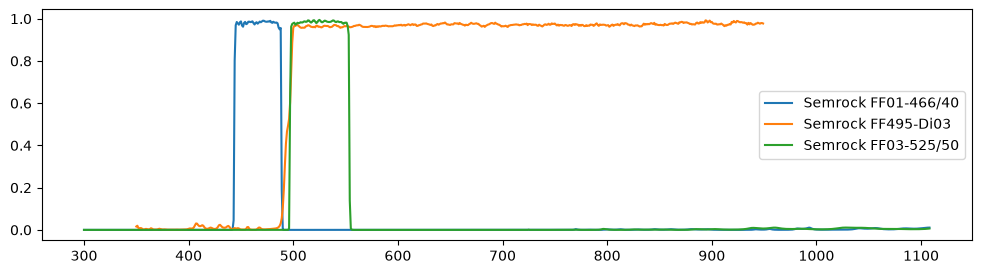
A fluorophore's absorption and emission spectra (normalized to their peaks), the excitation light that reaches the sample, and the transmission of the emission path. The emission path combines every filter in it: the dichroic mirror reflects the excitation light toward the sample and transmits the emission to the detector. Shaded: the absorption spectrum weighted by the excitation light, and the emission that passes the emission path. Hover for values. The filter sets in this and the other charts of this guide are measured spectra from FPbase: Chroma's ET filter sets (below), and the Semrock filters of an example microscope.
Built-in filter sets
microsim.schema.optical_config.lib
has idealized versions of common filter sets, built from smooth bandpass and
longpass edges, with the nominal band edges of Chroma's ET filter sets. They
are not measured spectra, and are meant for quick simulations; for real
filters, load them from FPbase (below). The interactive charts in this guide
use the measured spectra of the Chroma sets.
| Name | Excitation | Dichroic | Emission | Chroma set (FPbase) |
|---|---|---|---|---|
DAPI |
350/50 | 400 LP | 460/50 | "PMtA2n::Chroma 49000" |
ECFP |
436/20 | 455 LP | 480/40 | "PMtA2n::Chroma 49001" |
FITC |
470/40 | 495 LP | 525/50 | "PMtA2n::Chroma 49002" |
EYFP |
500/20 | 515 LP | 535/30 | "PMtA2n::Chroma 49003" |
TRITC |
545/25 | 565 LP | 605/70 | "PMtA2n::Chroma 49004" |
DSRED |
545/30 | 570 LP | 620/60 | "PMtA2n::Chroma 49005" |
CY5 |
620/60 | 660 LP | 700/75 | "PMtA2n::Chroma 49006" |
CY7 |
710/75 | 760 LP | 810/90 | "PMtA2n::Chroma 49007" |
Bandpass filters are written as center/width in nm. The last column is the string that loads the measured set (Filter sets from FPbase).
For point-scanning confocals, lib also has laser lines: a laser, a dichroic,
and an emission bandpass, with generic filter values. Their power is 1e5
W/cm², the peak irradiance at the focus (about 50 µW at the sample with a
1.4 NA objective).
| Name | Laser | Dichroic | Emission |
|---|---|---|---|
LASER_405 |
405 nm | 420 LP | 450/50 |
LASER_445 |
445 nm | 455 LP | 480/40 |
LASER_488 |
488 nm | 495 LP | 525/50 |
LASER_515 |
515 nm | 520 LP | 550/40 |
LASER_561 |
561 nm | 570 LP | 600/50 |
LASER_640 |
640 nm | 650 LP | 690/50 |
Filter sets from FPbase
FPbase lets you
enter the optical configurations of your own microscope,
with measured spectra of its light sources, filters, and detectors, and has
many microscopes entered by others.
These configurations can be loaded in microsim with a string of the form
"<microscope id>::<config name>":
sim = ms.Simulation(..., channels=["wKqWbg::Widefield Green"])
# equivalent:
ms.OpticalConfig.from_fpbase("wKqWbg", "Widefield Green")
The microscope ID is in the URL of its FPbase page, e.g.
fpbase.org/microscope/wKqWbgApvguSNDSRZNSfpN/ (the first few characters are
enough). Configuration names are not case-sensitive. Some FPbase microscopes
with filter catalogs:
Building your own
ms.OpticalConfig(
    name="GFP, 488 laser",
    lights=[ms.LightSource.laser(488)],
    filters=[
        ms.Longpass(cuton=495, placement="BS"),
        ms.Bandpass(bandcenter=525, bandwidth=50, placement="EM"),
    ],
    power=2000,  # W/cm² at the sample
)
Filters
| Filter | Parameters |
|---|---|
Bandpass |
bandcenter, bandwidth (nm), peak transmission |
Longpass |
cuton (nm), edge slope, transmission |
Shortpass |
cutoff (nm), edge slope, transmission |
SpectrumFilter |
a measured transmission Spectrum |
placement says where a filter sits in the light path:
placement |
Excitation path | Emission path | Typical use |
|---|---|---|---|
"EX" |
transmission | (not used) | excitation filter |
"EM" |
(not used) | transmission | emission filter |
"BS" |
1 − transmission | transmission | dichroic that reflects excitation |
"BSi" |
transmission | 1 − transmission | dichroic that reflects emission |
"ALL" |
transmission | transmission | e.g. a neutral density filter |
The defaults are "EX" for Shortpass, "EM" for Longpass, and "ALL"
for Bandpass and SpectrumFilter, so set placement explicitly for
bandpass filters. Filters in the same path are multiplied together.
Light sources
lights is a list of LightSource objects,
each with an emission spectrum. LightSource.laser(488)
makes a narrow line at 488 nm. With no light source, the channel is
illuminated by flat white light, so the excitation filters alone set the
spectrum.
Illumination power
OpticalConfig.power is the irradiance at the sample in W/cm², summed over
all wavelengths after the excitation filters. If it is not set, the irradiance
is 1 W/cm².
LightSource.power sets relative power only
When a channel has several light sources, each source's spectrum is
multiplied by its power before they are added, so power sets their
relative weight. For sources whose spectra have the same sum, such as
LightSource.laser lines, that is each source's share of the total. The
total is always OpticalConfig.power (or 1 W/cm²). Set power on the
OpticalConfig to change brightness.
Rough orders of magnitude for the irradiance at the sample:
| Microscope | Irradiance |
|---|---|
| widefield, arc lamp or LED | 0.1–10 W/cm² |
| widefield, laser | 10–1000 W/cm² |
| point-scanning confocal, at focus | 10–1000 kW/cm² |
For point-scanning modalities, power is the peak irradiance at the center of
the focused spot. See Modalities. To change the power
of a library channel, use e.g. lib.LASER_488.model_copy(update={"power": 1e4}).
Per-channel exposure
OpticalConfig.exposure_ms overrides Simulation.exposure_ms for one
channel:
channels = [
    lib.FITC.model_copy(update={"exposure_ms": 50}),
    lib.TRITC.model_copy(update={"exposure_ms": 200}),
]
Modifying the library configurations
The objects in lib are shared. Use model_copy(update={...}) to make a
modified copy, rather than assigning to lib.FITC.power directly, which
would change it everywhere in your session.
Bleedthrough and cross-excitation
microsim computes every fluorophore in every channel, so crosstalk needs no extra setup. A fluorophore excited by another channel's light (cross-excitation), or whose emission passes another channel's filter (bleedthrough), appears in that channel in proportion to the overlap of the spectra. Which light sources are on while a channel is recorded depends on whether channels are acquired one after another or at the same time.
Detected photons per molecule for two fluorophores in two channels, acquired
one after the other (each channel is excited only by its own light). Dashed
cells are crosstalk: the fluorophore gives less than half of that channel's
signal. tdTomato absorbs only weakly in the FITC excitation band, but it is
bright, and a 500 nm longpass emitter (Chroma ET500lp, in place of the
ET525/50m of the FITC set 49002) passes nearly all of its emission: per
molecule, it gives about 77% as much signal in the green channel as EGFP. With
the ET525/50m bandpass, its share drops to about 0.5%. Select
FITC (Chroma 49002) as channel 1 to compare.
To see where the signal in each channel comes from in an image, use
optical_image_per_fluor(),
which keeps the fluorophore dimension:
sim = ms.Simulation(
    truth_space=ms.ShapeScaleSpace(shape=(64, 512, 512), scale=0.064),
    sample=[
        ms.FluorophoreDistribution(
            distribution=ms.CosemLabel(dataset="jrc_hela-3", label="er-mem_pred"),
            fluorophore="EGFP",
        ),
        ms.FluorophoreDistribution(
            distribution=ms.CosemLabel(dataset="jrc_hela-3", label="mito-mem_pred"),
            fluorophore="tdTomato",
        ),
    ],
    channels=[lib.FITC, fitc_longpass],  # (1)!
)
per_fluor = sim.optical_image_per_fluor()  # (c, f, z, y, x)
per_fluor.sum(["z", "y", "x"])  # total photons/s from each fluorophore in each channel
fitc_longpassislib.FITCwith its emission filter replaced byms.Longpass(cuton=500, placement="EM").
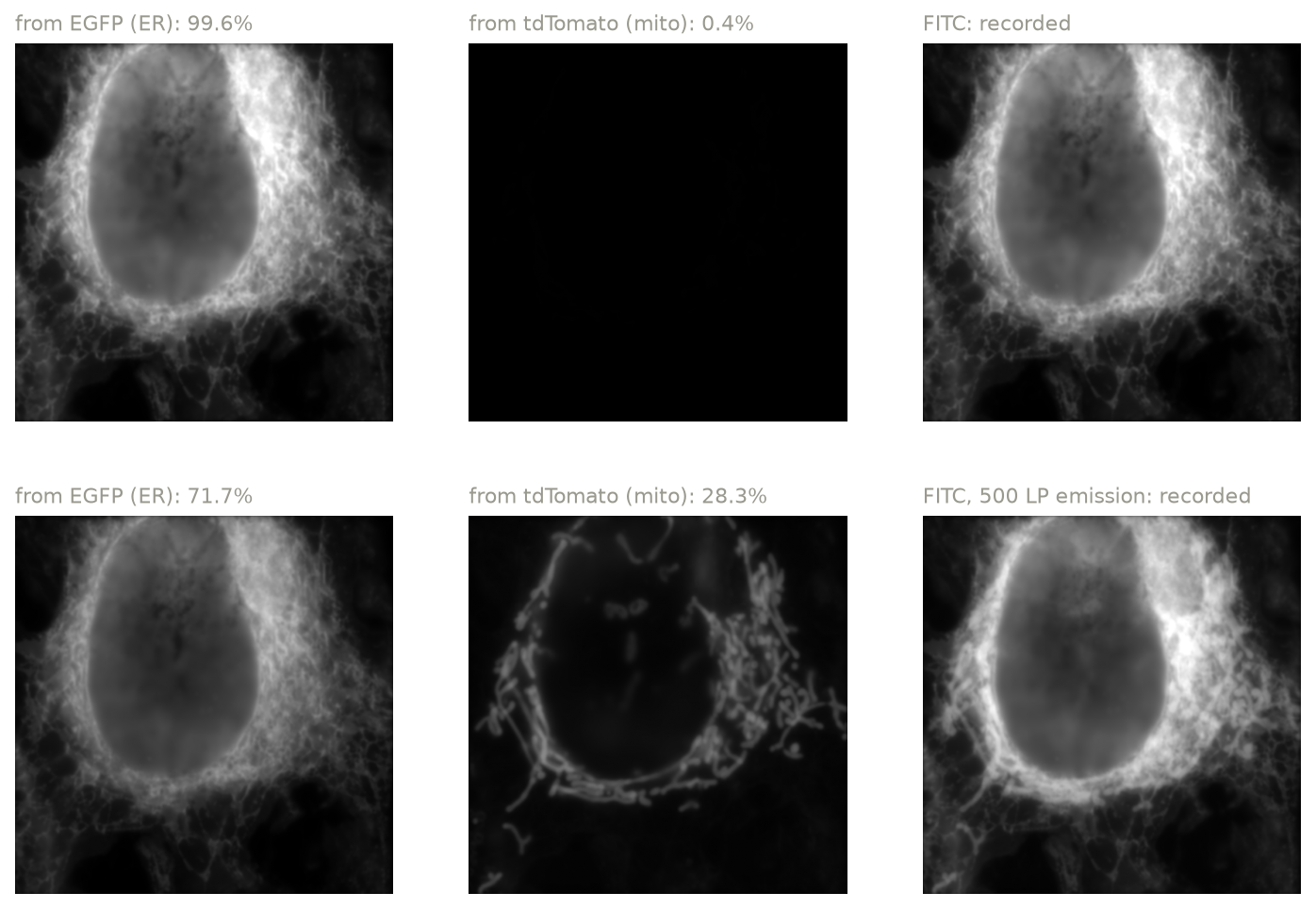
A HeLa cell with EGFP on the ER and tdTomato on the mitochondria, recorded in the green channel with a 525/50 bandpass (top) and a 500 nm longpass (bottom) emission filter. Each row has one display range, so each panel shows its true contribution. With the longpass filter, the mitochondria appear in the green channel.
Sequential and simultaneous acquisition
By default, channels are acquired one after another, so each channel is
excited only by its own light sources. Simulation.tracks
groups channels that are acquired at the same time, as in the tracks of a
point scanner. All light sources of all channels in a track are on together,
and each channel's detector records at the same time, so a fluorophore can be
excited by any light source of its track:
from microsim.schema.optical_config.lib import (
    LASER_405,
    LASER_488,
    LASER_561,
    LASER_640,
)

sim = ms.Simulation(
    ...,
    channels=[LASER_405, LASER_488, LASER_561, LASER_640],
    tracks=[[0, 2], [1, 3]],  # or by name: [["405", "561"], ["488", "640"]]
)
tracks |
Meaning |
|---|---|
"sequential" (default) |
each channel is its own track |
"simultaneous" |
one track with all channels |
| a list of lists | channels by index in channels, or by name |
Each list is shorthand for a Track, e.g.
Track(channels=[0, 2]), and every channel must be in exactly one track.
- A light source listed in several channels of a track (e.g. two detection
windows behind one laser) is one light source, on once, so those channels
must have the same
powerand excitation-side filters (including the dichroic). Channels in a track must have either the same light sources or none in common. - On a point scanner, the channels of a track have one pixel dwell time, so
they must have the same
exposure_ms. - Each channel detects through its own filters, including its own dichroic. On a real scanner, the channels of a track share one (multiband) dichroic; give them matching dichroics if that matters for your simulation.
- With a
Confocalmodality, the channels of a track are detected through one pinhole (unlessshared_pinhole=False).
Plotting spectra
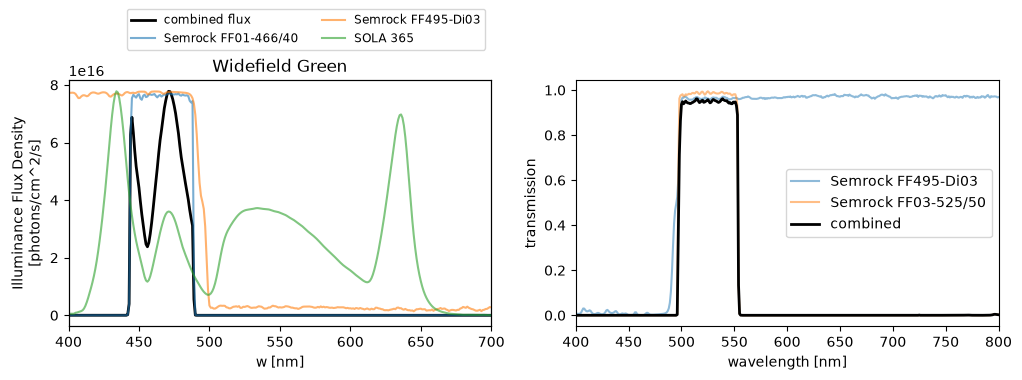
These need the view extra. For one channel:
fig, axes = plt.subplots(1, 2, figsize=(12, 3.2))
oc.plot_excitation(
    ax=axes[0]
)  # light source and excitation filters, and the photon flux
oc.plot_emission(ax=axes[1])  # emission filters, and their combined transmission
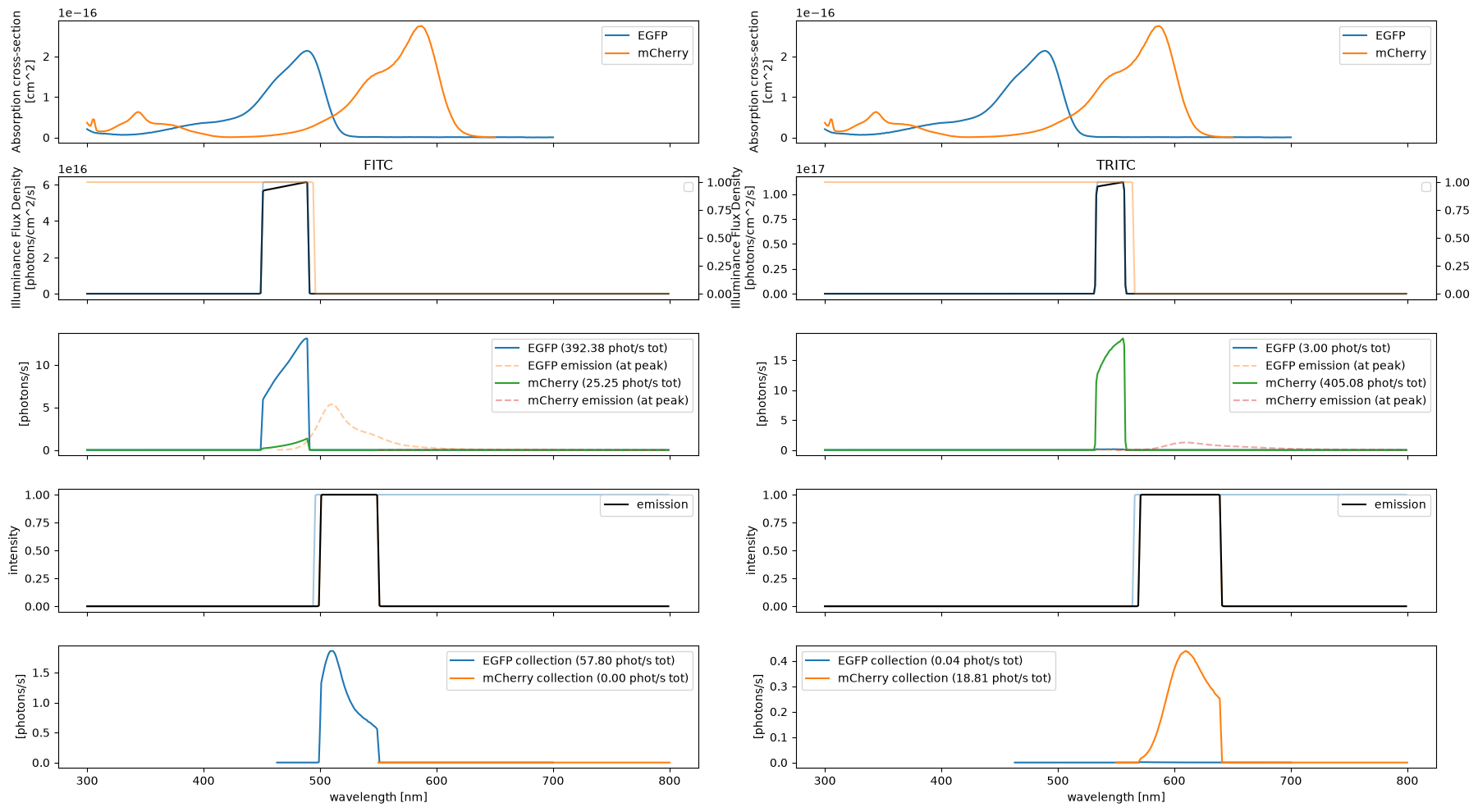
For a whole simulation, Simulation.plot() shows,
for each channel (columns): the absorption cross sections, the excitation
path, the absorption rates (with the emission spectra, dashed), the emission
path, and the photons collected from each fluorophore. Here EGFP and mCherry
in the FITC and TRITC channels:
Spectral detection
lib.spectral_detector
returns a list of channels that split an emission range into equal bins, as
on a spectral confocal:
This is a simplified model: each bin is an ideal rectangular filter, and a dichroic reflects a 10 nm band around each laser line.