microsim
microsim simulates fluorescence microscopy images. You describe a sample, a microscope, and a detector, and it calculates the photons the sample emits, the image the optics form, and the noisy digital image a camera or point detector records.
Simulated images of nucleus, mitochondria, and endoplasmic reticulum. The
ground truth comes from FIB-SEM segmentations of cell jrc_hela-3
at OpenOrganelle.
What it's for
- Ground truth for image analysis. Every simulated image comes with the exact fluorophore distribution that produced it. You can use the pairs to train or benchmark segmentation, denoising, deconvolution, or super-resolution methods.
- Planning experiments. Ask what a different objective, filter set, fluorophore, exposure time, or detector would do to your images before you change them on the microscope.
- Teaching. Each step of image formation can be computed and plotted on its own: absorption spectra, filter transmission, PSFs, shot noise, read noise.
How it works
A simulation is a single Simulation object that holds
every parameter. Running it takes the sample through four stages:
flowchart LR
    A["<b>Sample</b><br/>fluorophores per voxel,<br/>in a high-resolution space"] --> B["<b>Emission</b><br/>photons/s per fluorophore,<br/>per channel and wavelength"]
    B --> C["<b>Optical image</b><br/>photons/s, blurred<br/>by the PSF"]
    C --> D["<b>Digital image</b><br/>gray values, with<br/>pixelation and noise"]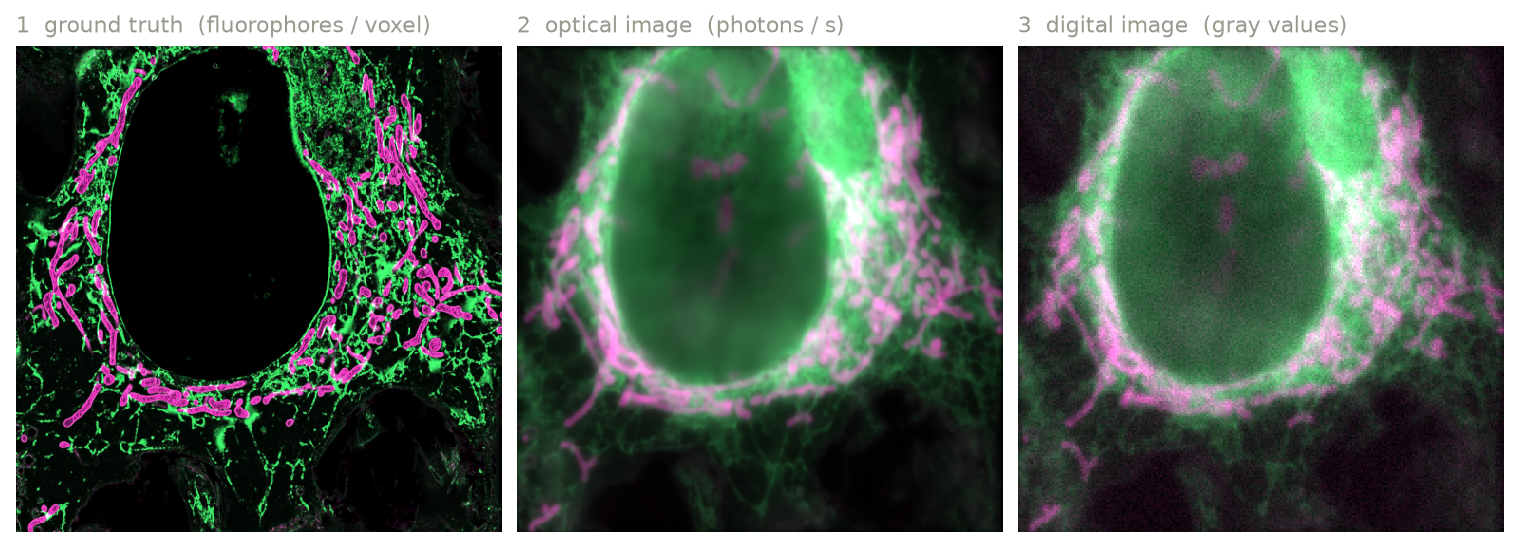
Each stage has its own method, and returns a labeled
xarray.DataArray that you can inspect, plot, or save. The
User guide explains each stage.
A first example
from microsim import schema as ms
from microsim.util import ortho_plot

sim = ms.Simulation(
    truth_space=ms.ShapeScaleSpace(shape=(128, 512, 512), scale=(0.02, 0.01, 0.01)),
    output_space={"downscale": 8},
    sample=ms.Sample(labels=[ms.MatsLines(density=0.5, length=30, azimuth=5)]),
    detector=ms.CameraCMOS(),
)
result = sim.run()  # (C, Z, Y, X) array of gray values
ortho_plot(result)
First simulation goes through this example line by line.
Where to go next
-
Install
pip install "microsim[all]", optional GPU backends, and a development setup. -
First simulation
Build a simulation step by step and look at the output of each stage.
-
User guide
Samples, filters, light sources, PSFs, and detectors: what each part models and how to configure it.
-
API reference
Every model, field, and default value.
Pin your version
microsim is in early development and changes quickly. New releases may
include breaking API changes, and the same parameters may produce
different simulation results as the physical models are corrected and
extended. If you depend on microsim for a project, pin a specific version
(e.g. microsim==0.x.y) and record it alongside your results.
Issues and pull requests are welcome on GitHub.