First simulation
This page builds a simulation, runs it, and looks at the result of each stage.
It needs the view extra for plotting (included in microsim[all]).
Build and run it
from microsim import schema as ms
from microsim.util import ortho_plot

sim = ms.Simulation(
    truth_space=ms.ShapeScaleSpace(  # (1)!
        shape=(128, 512, 512),
        scale=(0.02, 0.01, 0.01),
    ),
    output_space={"downscale": 8},  # (2)!
    sample=ms.Sample(  # (3)!
        labels=[ms.MatsLines(density=0.5, length=30, azimuth=5)]
    ),
    detector=ms.CameraCMOS(),  # (4)!
)

result = sim.run()  # (5)!
ortho_plot(result)
- The truth space is the grid on which the sample is drawn and the optics are computed: 128 × 512 × 512 voxels (Z, Y, X), each 20 × 10 × 10 nm. That is a 2.56 × 5.12 × 5.12 µm volume. Lengths are in micrometers.
- The output space is the pixel grid of the final image.
downscale: 8bins the truth space by 8 along each axis, giving 16 × 64 × 64 pixels of 160 × 80 × 80 nm. - The sample is a list of labels.
MatsLinesdraws randomly oriented line segments, one voxel wide, with one fluorophore per voxel. - The detector converts photons to gray values and adds noise. This is a CMOS camera with default settings.
run()executes every stage and returns the digital image.
Everything not given has a default value. In this case:
| Parameter | Default |
|---|---|
modality |
Widefield() |
objective_lens |
1.4 NA oil immersion (ObjectiveLens()) |
channels |
one FITC/GFP filter set, with 1 W/cm² of white light through the excitation filter |
| fluorophore | a placeholder fluorophore with flat spectra (see Samples) |
exposure_ms |
100 ms |
settings |
NumPy backend (or CuPy if installed), float32, and a new random seed each time the Simulation is created |
Dictionaries work too
As usual with pydantic models, any parameter can be given as a dictionary (or loaded from JSON) instead of an object. These are equivalent:
When a field accepts several types, a "type" key selects one, as in
{"type": "confocal", "pinhole_au": 1}. Unknown keys raise an error rather
than being ignored.
Look at each stage
run() computes four stages in order and returns the last one. Each stage
also has its own method, and each returns an xarray.DataArray with
named dimensions and physical coordinates (µm):
| Method | Dimensions | Units |
|---|---|---|
ground_truth() |
(f, z, y, x) |
fluorophores per voxel |
filtered_emission_rates() |
(c, f, w) |
photons/s per fluorophore |
optical_image() |
(c, z, y, x) |
photons/s per voxel |
digital_image() |
(c, z, y, x) |
gray values |
Dimension names: f fluorophore, c channel, w wavelength (nm), and z,
y, x in µm.
truth = sim.ground_truth()  # the sample
optical = sim.optical_image()  # the light reaching the detector
digital = sim.digital_image(optical)  # (1)!
- Passing
opticalin avoids computing it again. This is useful to try several detectors or exposure times on one optical image.
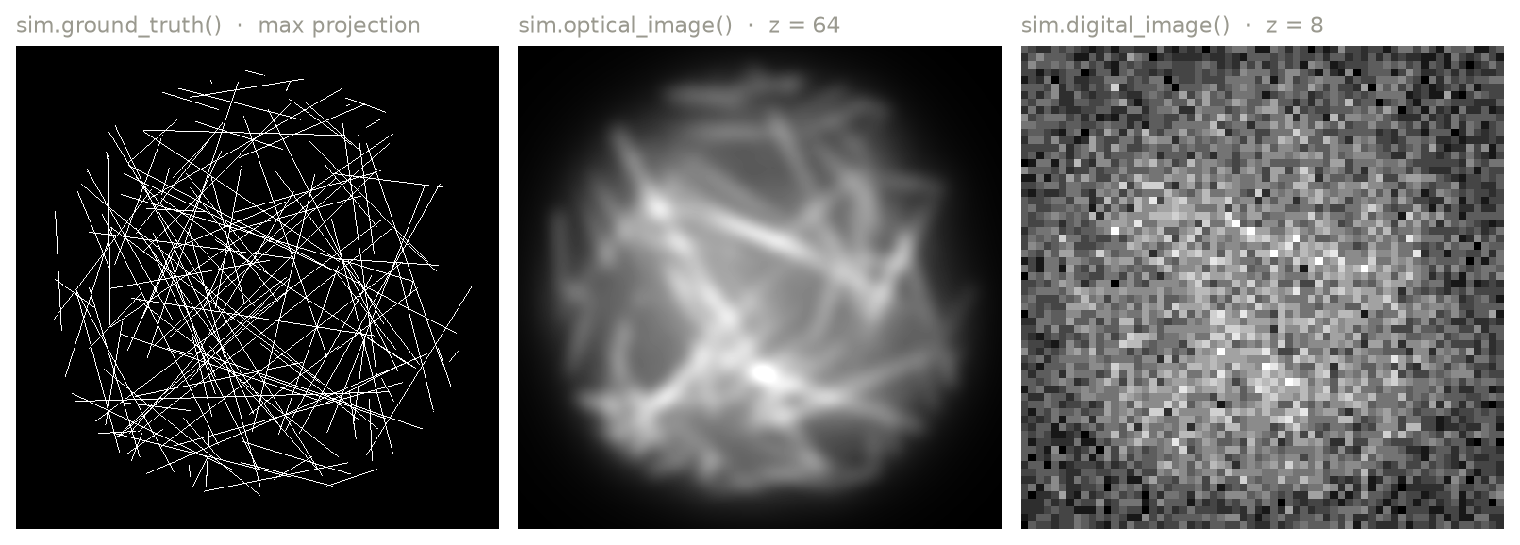
Left to right: the ground truth (maximum projection), one plane of the optical image in the truth space, and one plane of the digital image in the output space.
The optical image is blurred but noise-free. The digital image is pixelated and noisy, and it is dim: the brightest pixel is about 10 gray values above the camera offset of 100.
Make it brighter
The simulation works in physical units, so brightness follows from labeling density, illumination intensity, and exposure time, as on a real microscope. Here the sample is sparse (a single fluorophore per 10 nm voxel along each line) and the illumination is weak. Raising the irradiance of the channel to 10 W/cm² gives ten times as many photons:
from microsim.schema.optical_config import lib

sim.channels = [lib.FITC.model_copy(update={"power": 10})]  # (1)!
result = sim.run()
lib.FITCis the default channel.model_copymakes a modified copy; settinglib.FITC.powerdirectly would change it for every simulation in the session.poweris in W/cm² at the sample.
A confocal microscope focuses a laser to a diffraction-limited spot and scans
it, so its irradiance is far higher (kW/cm² to MW/cm² at the focus) and the
time per pixel is far shorter (microseconds). For point-scanning modalities
power is the peak irradiance at the focus and exposure_ms is the pixel
dwell time. lib has laser lines
for this:
sim.modality = ms.Confocal(pinhole_au=0.5)
sim.channels = [lib.LASER_488.model_copy(update={"power": 50_000})]  # W/cm² at focus
sim.exposure_ms = 0.01  # 10 µs per pixel
result = sim.run()
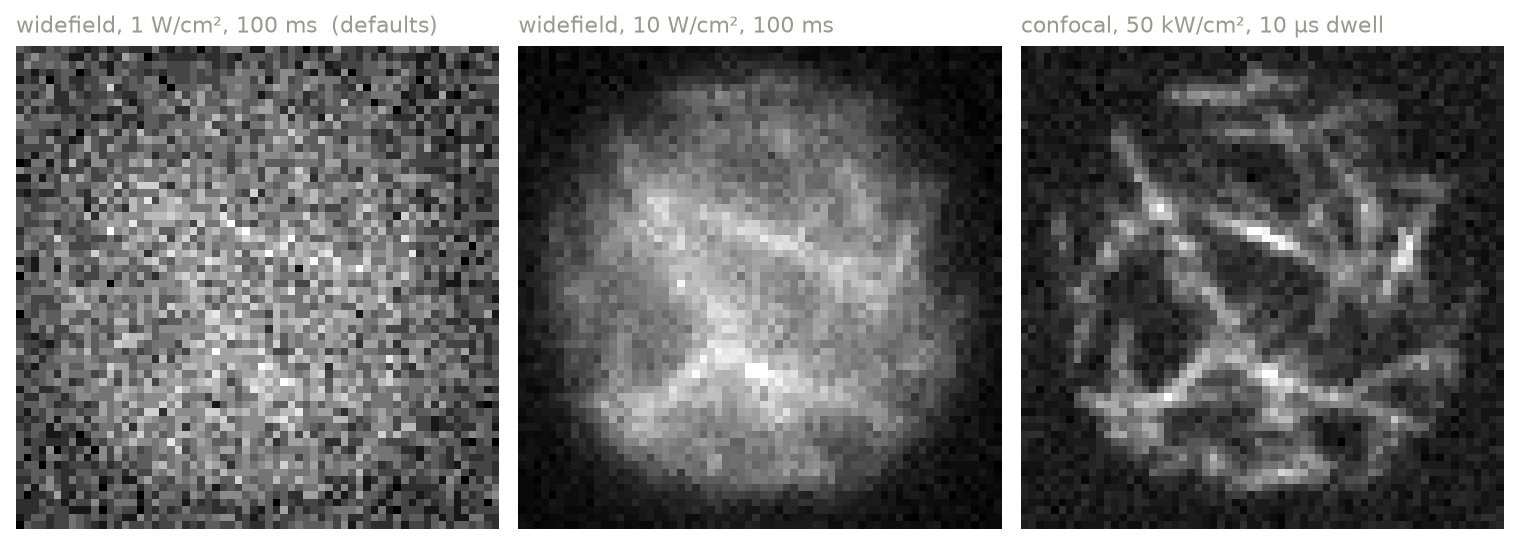
The digital image at the default 1 W/cm², at 10 W/cm², and as a confocal image with a 0.5 AU pinhole. Each panel is scaled to its own range.
Reproducibility
The random lines in the sample and the noise come from a random number generator. To get the same result every time, set a seed:
Without it, each new Simulation picks a random seed.
Next steps
- Overview of how the parts of a simulation fit together.
- Samples: use real fluorophores, several labels, or your own ground truth.
- Saving and loading: write results to disk and store simulations as JSON.
- Tutorial: two-color cell: a longer example with realistic ground truth.