Two-color imaging of a cell
Open in Colab Download notebook
This tutorial simulates a widefield image of a HeLa cell with the endoplasmic reticulum (ER) labeled with EGFP and the mitochondria labeled with mCherry. Along the way it plots each step of the photon budget, so you can see where the signal and the crosstalk in each channel come from.
It needs the cosem and view extras (both in microsim[all]) and network
access, to download the ground truth from OpenOrganelle and spectra from
FPbase.
A first sample
The simplest sample is a set of random lines in a 64 × 256 × 256 volume of 10 nm voxels:
from microsim import schema as ms
from microsim.util import ortho_plot

sim = ms.Simulation(
    truth_space=ms.ShapeScaleSpace(shape=(64, 256, 256), scale=0.01),
    sample=[ms.MatsLines()],
)

ortho_plot(sim.ground_truth(), mip=True)
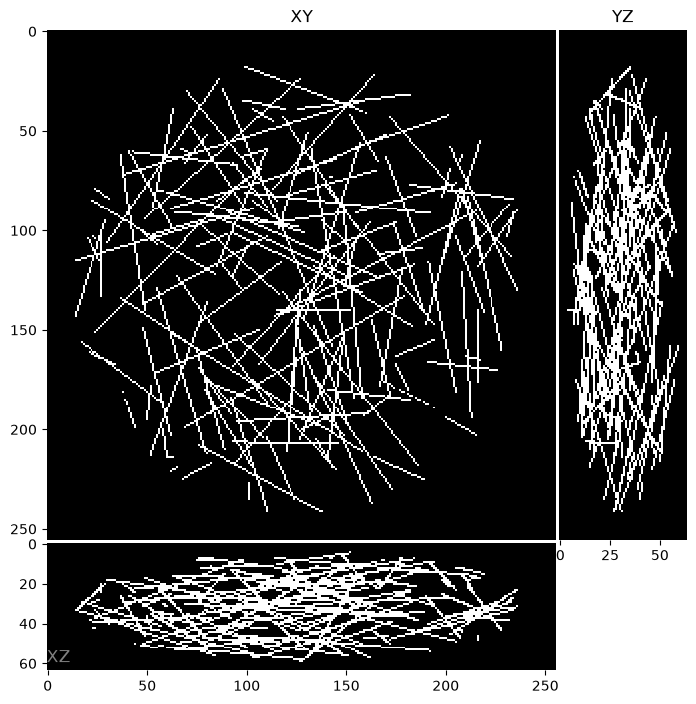
ortho_plot shows XY, XZ, and YZ views, either
through the center of the volume or (with mip=True) as maximum projections.
Realistic ground truth from OpenOrganelle
OpenOrganelle publishes FIB-SEM volumes
of whole cells, with organelles segmented at 4–8 nm resolution.
CosemLabel turns a segmentation layer into a
ground truth. Here we use the ER membrane and mitochondrial membrane
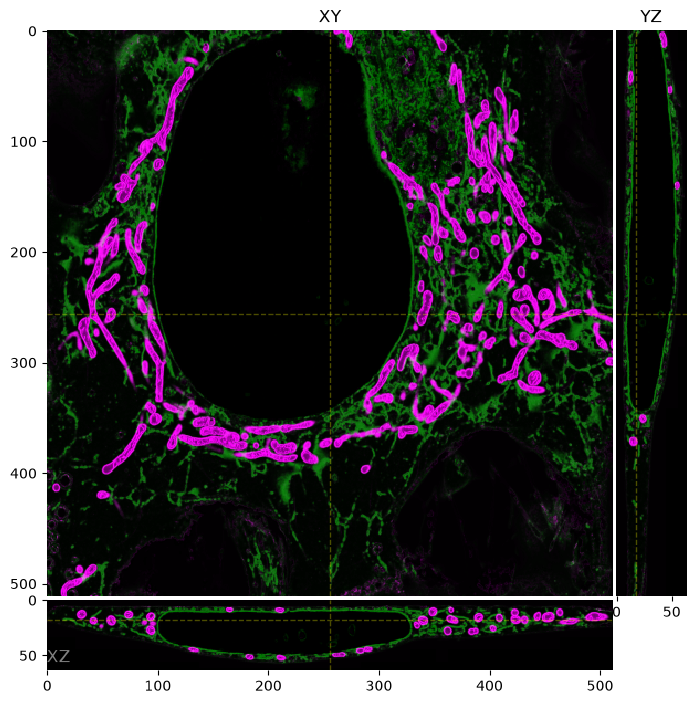
predictions from cell jrc_hela-3, on a 64 nm grid:
sim = ms.Simulation(
    truth_space=ms.ShapeScaleSpace(shape=(64, 512, 512), scale=(0.064, 0.064, 0.064)),
    sample=[
        ms.CosemLabel(dataset="jrc_hela-3", label="er-mem_pred"),
        ms.CosemLabel(dataset="jrc_hela-3", label="mito-mem_pred"),
    ],
)

ortho_plot(sim.ground_truth(), z=18)
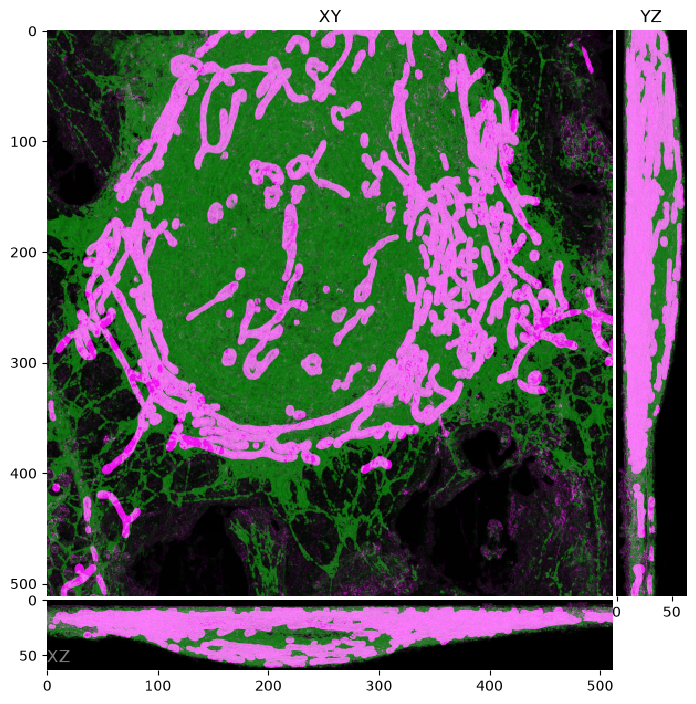
Or as maximum projections:
The optical image
With no other configuration, the simulation uses a widefield microscope with a 1.4 NA objective and a FITC filter set:
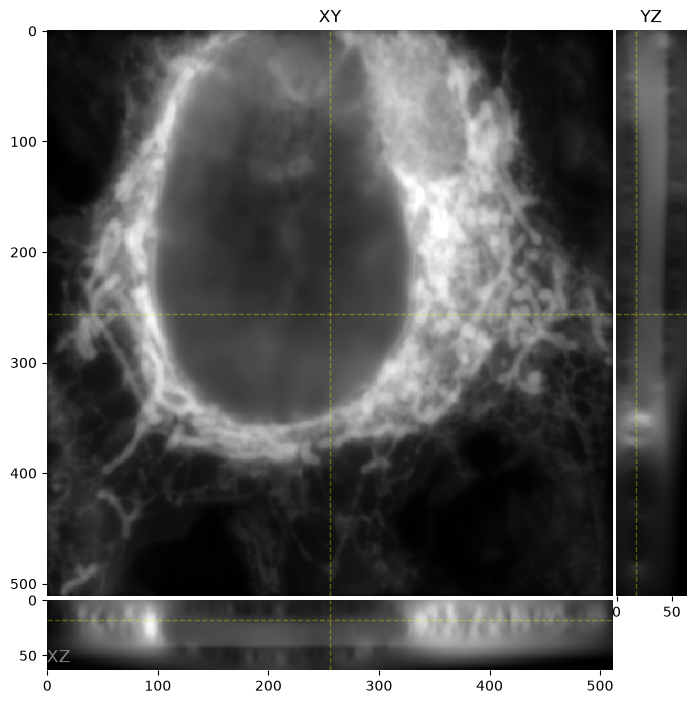
This looks like a widefield image of a cell, but the ER and mitochondria appear together in the one channel. Neither label has a fluorophore, so both use the placeholder fluorophore, which is excited by any light and passes any filter.
Fluorophores and channels
Next we give each label a fluorophore and define two channels. The fluorophore properties come from FPbase, and so do the two channels: the "Widefield Green" and "Widefield Red" configurations of the Example Simple Widefield microscope, which use an LED light source and Semrock filters.
sim = ms.Simulation(
    truth_space=ms.ShapeScaleSpace(shape=(64, 512, 512), scale=(0.064, 0.064, 0.064)),
    sample=[
        ms.FluorophoreDistribution(
            distribution=ms.CosemLabel(dataset="jrc_hela-3", label="er-mem_pred"),
            fluorophore="EGFP",
        ),
        ms.FluorophoreDistribution(
            distribution=ms.CosemLabel(dataset="jrc_hela-3", label="mito-mem_pred"),
            fluorophore="mCherry",
        ),
    ],
    channels=[
        ms.OpticalConfig.from_fpbase(
            microscope_id="wKqWbg", config_name="Widefield Green"
        ),
        ms.OpticalConfig.from_fpbase(
            microscope_id="wKqWbg", config_name="Widefield Red"
        ),
    ],
)
How many photons a fluorophore contributes to a channel depends on two overlaps: between its absorption spectrum and the excitation light, and between its emission spectrum and the emission filters and detector. The next sections follow the photons through both. The Photon budget page has the equations.
Absorption
from matplotlib import pyplot as plt

plt.figure(figsize=(12, 4))
for lbl in sim.sample.labels:
    fluor = lbl.fluorophore
    fluor.absorption_cross_section.plot.line(label=fluor.name)
plt.legend()
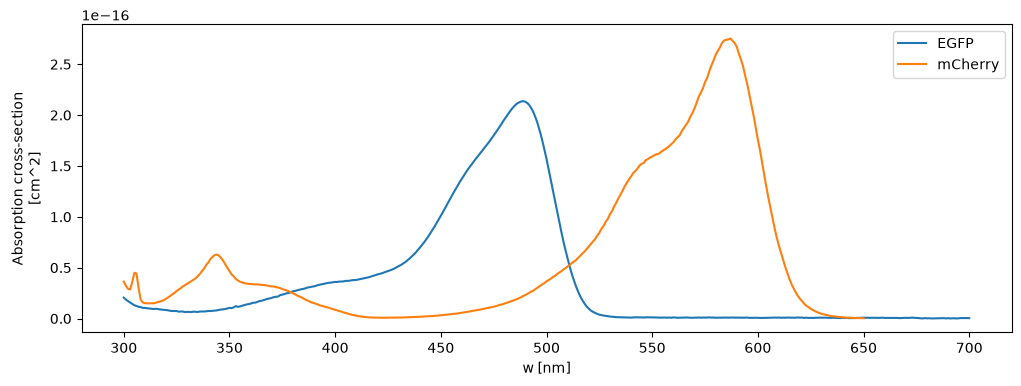
The excitation spectra from FPbase, scaled by each fluorophore's extinction coefficient and converted to an absorption cross section in cm² per molecule.
Excitation light
fig, axes = plt.subplots(1, len(sim.channels), figsize=(12, 3))
for ax, oc in zip(axes, sim.channels):
    oc.plot_excitation(ax=ax)
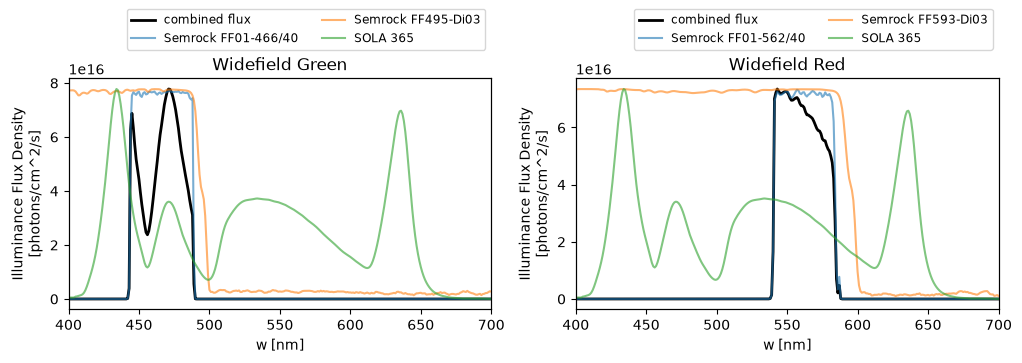
The colored lines are the LED spectrum and the excitation-side filters
(right-hand scale, relative). The black line is the photon flux reaching the
sample (left-hand scale, photons/cm²/s). The channel's power is not set, so
the total irradiance is the default 1 W/cm². Change it with
oc.power = <W/cm²>.
Absorption rate
The product of cross section and photon flux is the absorption rate: photons absorbed per second, per molecule.
fig, axes = plt.subplots(1, len(sim.channels), figsize=(12, 3))
for ax, oc in zip(axes, sim.channels):
    for lbl in sim.sample.labels:
        abs_rate = oc.absorption_rate(lbl.fluorophore)
        abs_rate.plot(
            ax=ax, label=f"{lbl.fluorophore.name} ({abs_rate.sum():.0f} photons/s)"
        )
    ax.set_xlim(400, 700)
    ax.legend(loc="center right")
    ax.set_title(oc.name)
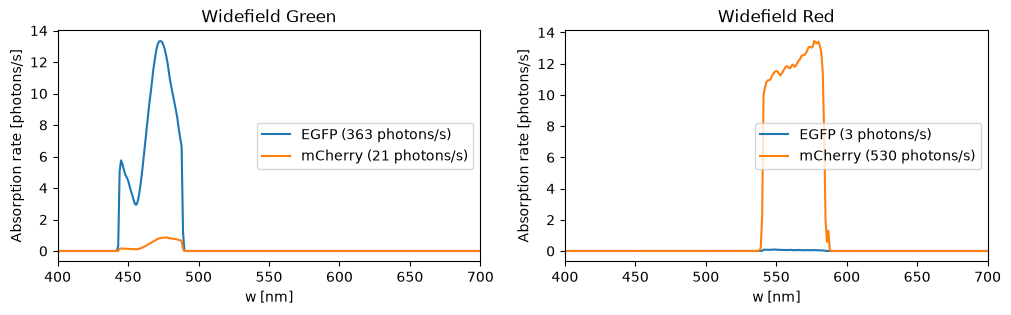
EGFP is excited mostly by the green channel and mCherry by the red one. The green channel also excites mCherry a little (21 vs. 530 photons/s): this is cross-excitation, one source of crosstalk.
Emission
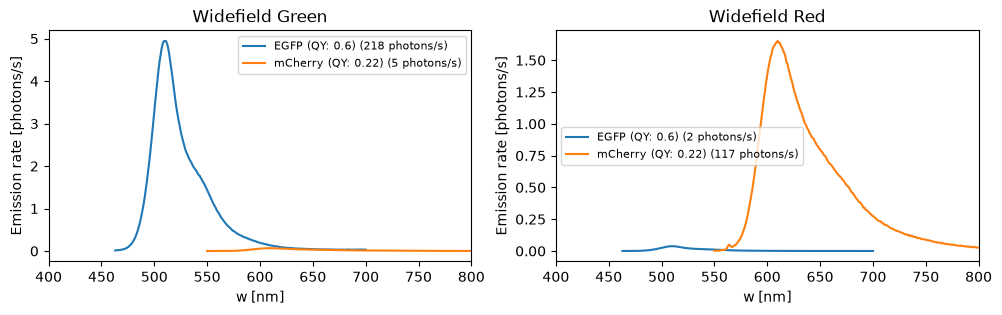
Each absorbed photon is re-emitted with a probability equal to the quantum yield, with wavelengths distributed according to the emission spectrum:
fig, axes = plt.subplots(1, len(sim.channels), figsize=(12, 3))
for ax, oc in zip(axes, sim.channels):
    for lbl in sim.sample.labels:
        fluor = lbl.fluorophore
        em_rate = oc.total_emission_rate(fluor)
        em_rate.plot(
            ax=ax,
            label=f"{fluor.name} (QY: {fluor.quantum_yield}) ({em_rate.sum():.0f} photons/s)",
        )
    ax.set_xlim(400, 800)
    ax.legend(fontsize=8)
    ax.set_title(oc.name)
Emission path
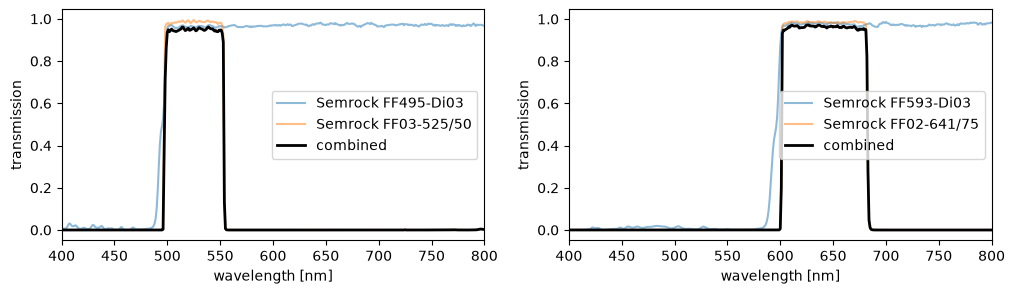
The emitted light then passes the dichroic and emission filter. Their combined transmission (black) selects the light that reaches the detector:
fig, axes = plt.subplots(1, len(sim.channels), figsize=(12, 3))
for ax, oc in zip(axes, sim.channels):
    oc.plot_emission(ax=ax)
Detected photons
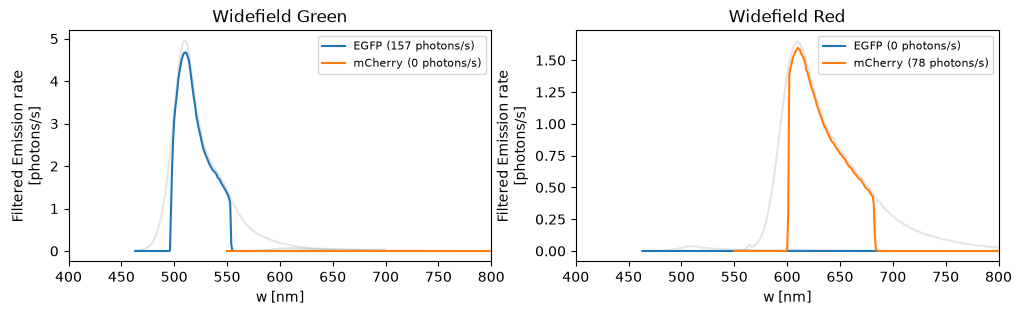
Multiplying the emission rate by the transmission of the emission path gives the photons per second that pass the filters, for each fluorophore in each channel:
fig, axes = plt.subplots(1, len(sim.channels), figsize=(12, 3))
for ax, oc in zip(axes, sim.channels):
    for lbl in sim.sample.labels:
        fluor = lbl.fluorophore
        oc.total_emission_rate(fluor).plot(ax=ax, color="k", alpha=0.1)
        filtered = oc.filtered_emission_rate(fluor)
        filtered.plot(ax=ax, label=f"{fluor.name} ({filtered.sum():.0f} photons/s)")
    ax.set_xlim(400, 800)
    ax.legend(fontsize=8)
    ax.set_title(oc.name)
Collection efficiency
These per-channel plots assume that every emitted photon reaches the
filters. In the simulation, the rates are also multiplied by the fraction
of light the objective collects, about 35% for this 1.4 NA objective, and,
if a detector is set, by its QE. sim.filtered_emission_rates() returns
the rates with these applied. See Photon budget.
The optical image, again
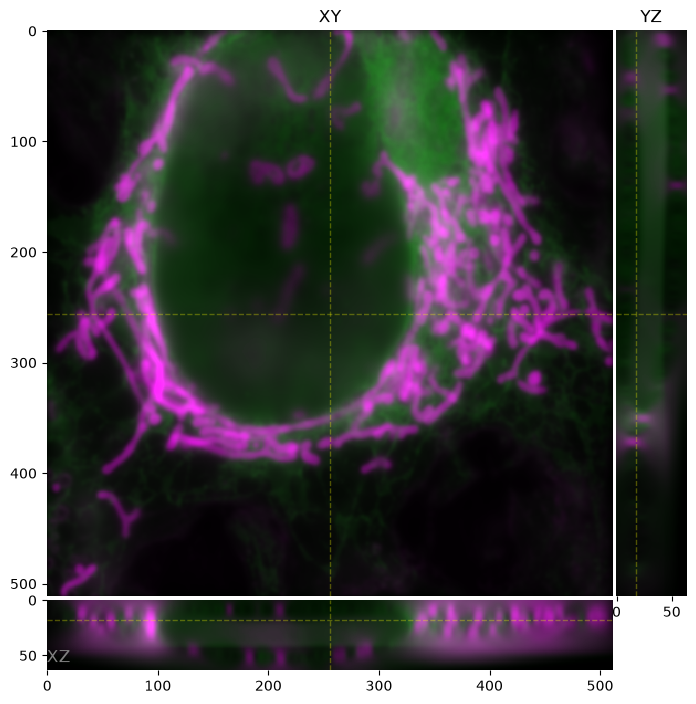
Now each fluorophore's light is assigned to the channels in proportion to the rates above:
Detector and pixels
To get a digital image we add a detector, which determines the noise, and an
output space, which sets the pixel size. Here, the
ICX285 CCD and pixels twice the
size of the truth voxels (128 nm):
sim.detector = ms.detectors.lib.ICX285
sim.output_space = ms.DownscaledSpace(downscale=2)

ortho_plot(sim.digital_image(exposure_ms=100), z=9)
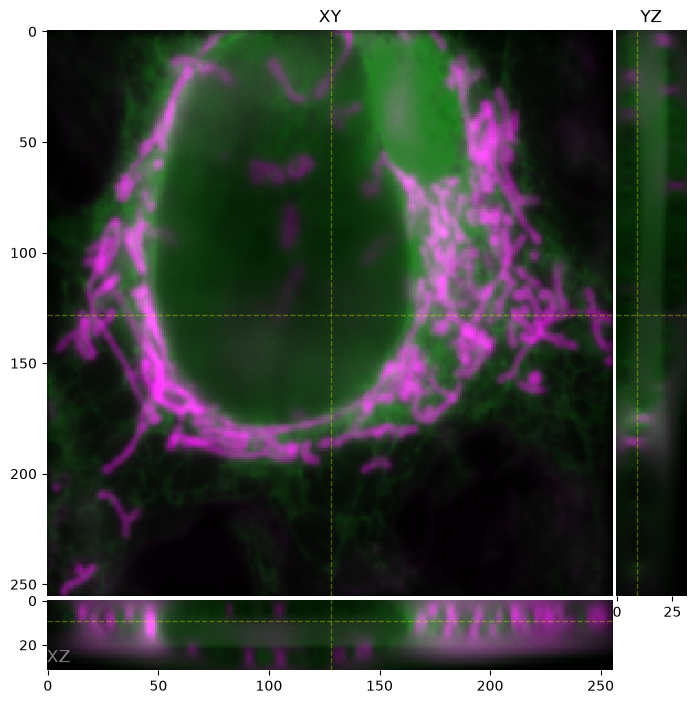
With a ten times shorter exposure, there are ten times fewer photons, and the shot noise and read noise are more visible:
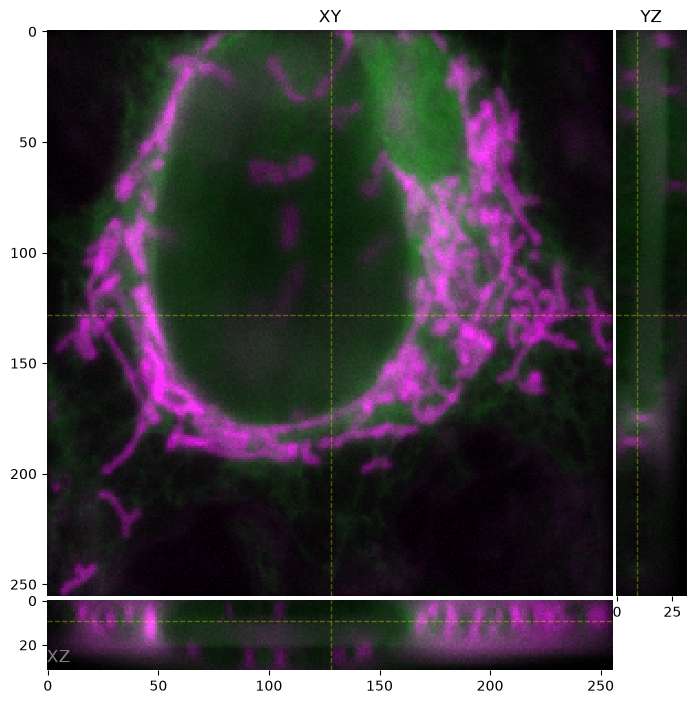
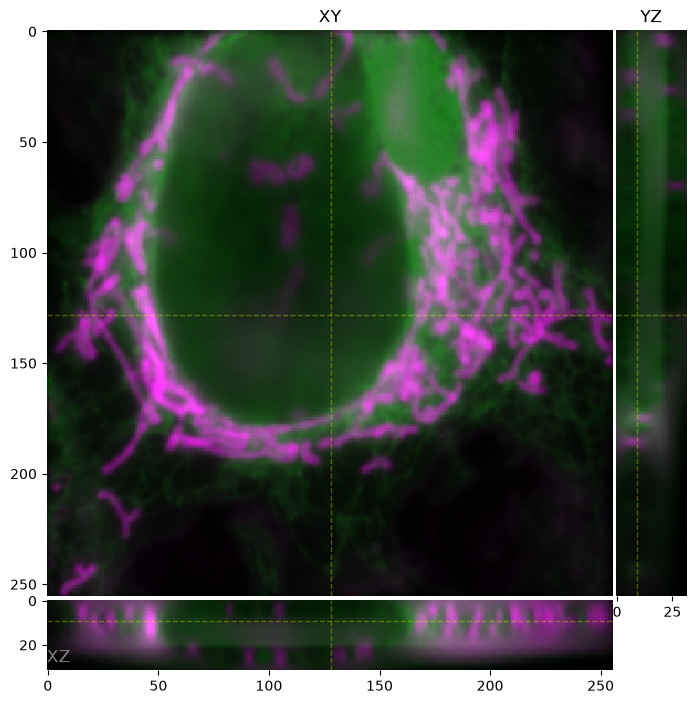
Raising the illumination to 10 W/cm² brings the signal back:
sim.channels[0].power = 10
sim.channels[1].power = 10
ortho_plot(sim.digital_image(exposure_ms=10), z=9)
Confocal
Changing the modality to Confocal removes most of
the out-of-focus light. For a point-scanning modality, power is the peak
irradiance at the focus of the laser spot and exposure_ms is the dwell time
per pixel, so both are set to typical confocal values:
sim.modality = ms.Confocal(pinhole_au=1)
sim.channels[0].power = 5_000  # W/cm² at the focus
sim.channels[1].power = 5_000

ortho_plot(sim.digital_image(exposure_ms=0.01), z=9)  # 10 µs pixel dwell
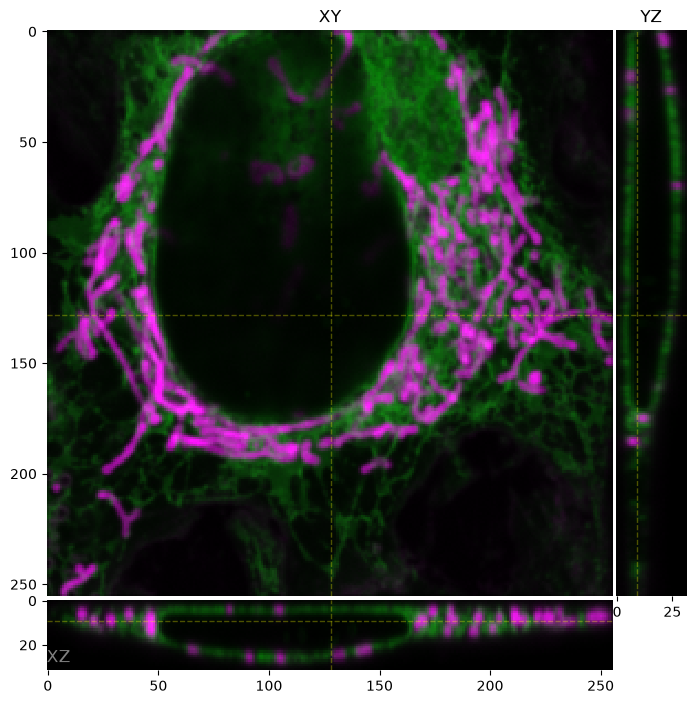
The channels still use the LED spectrum from the widefield configuration;
only the irradiance and the PSF changed. For laser excitation, use the
laser lines in lib (e.g.
LASER_488). The detector is still the CCD camera;
point-scanning confocals record with point detectors, as in
point-scanning detectors.